Spartacus Ux-Design blog
https://www.ispartakos.com/blog
KirbyGet Latest news from SpartacusPapyrus
https://www.ispartakos.com/blog/papyrus
blog/papyrusMon, 01 Sep 2025 00:00:00 +0000We can't handle the future, if we are not able to keep pace with present and most of all inherit the past properly. We can't disrupt the mental mode we earned so far, for the sake of excitement.
For instance, Material Design has been a great outcome for Design standards, coz it was generated according to traditional typography. Shout out to Dhurer and Bodoni!
Yes indeed, we need a smooth hand-off process. Evolution, not involution. Yet, we get to see people using font families like "Papyrus" or "Comic Sans" ... and i'm speaking of professional, not only customers. How do we conciliate this bad habits with the new mindset? Don't idolize Ai. Don't push Ai or any other tech-fancy-ass-innovation with shocking headlines, if your' surrounded by co-workers and customers who do not comprehend the ABC of Design and Development matters. It's misleading and not helpfull at all
]]>Multi Brand
https://www.ispartakos.com/blog/multi-brand
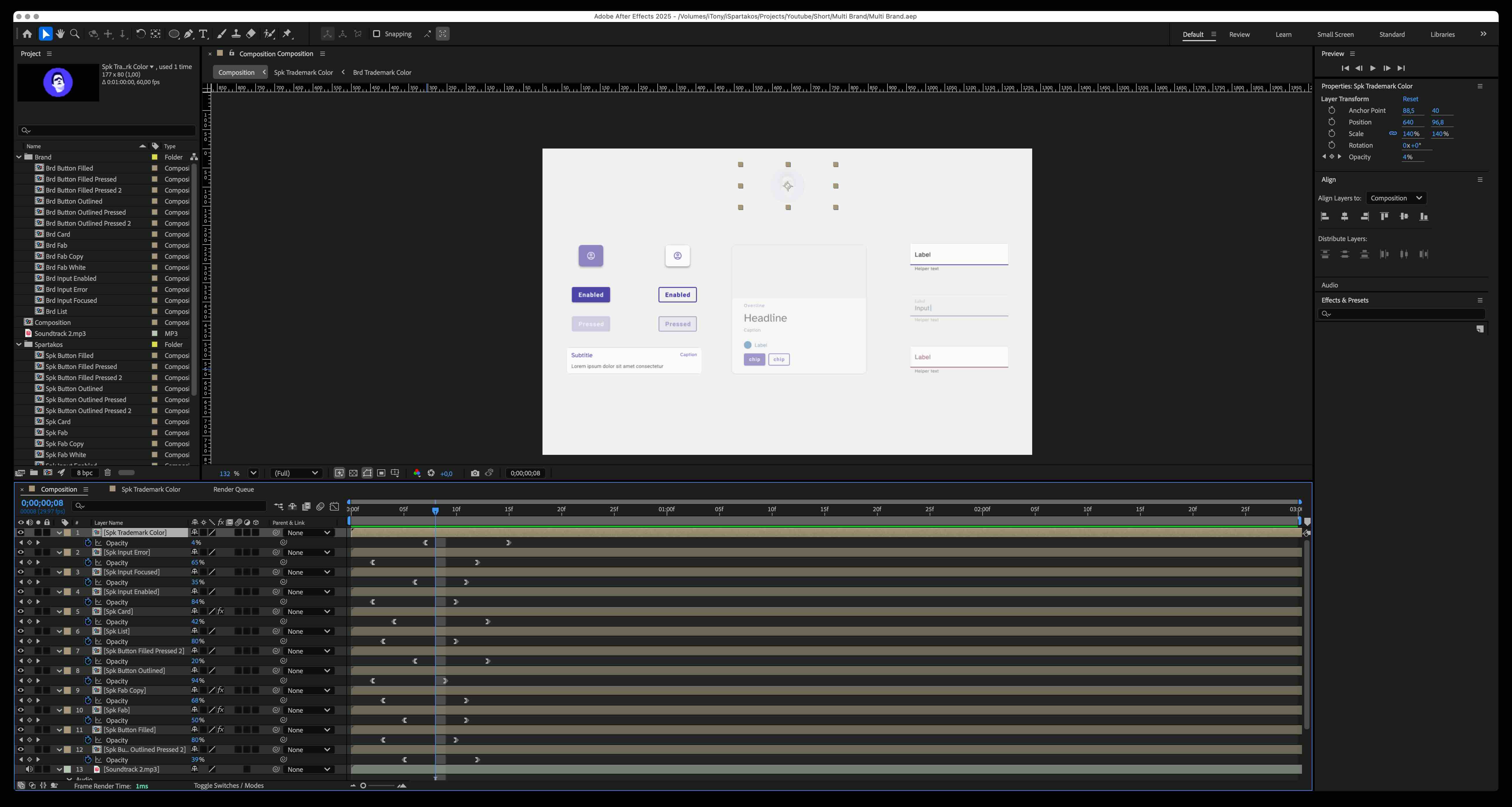
blog/multi-brandFri, 08 Aug 2025 00:00:00 +0000My core business is Design System to build awesome web or native apps with visual consistency. To do so, I need to express a Design System advantages, like the Multi Brand, with video effects. Yes indeed, I do enjoy video editing Ui elements like Buttons, Card, Inputs and so on.
After Effects Screenshot. Here I used composition for each element
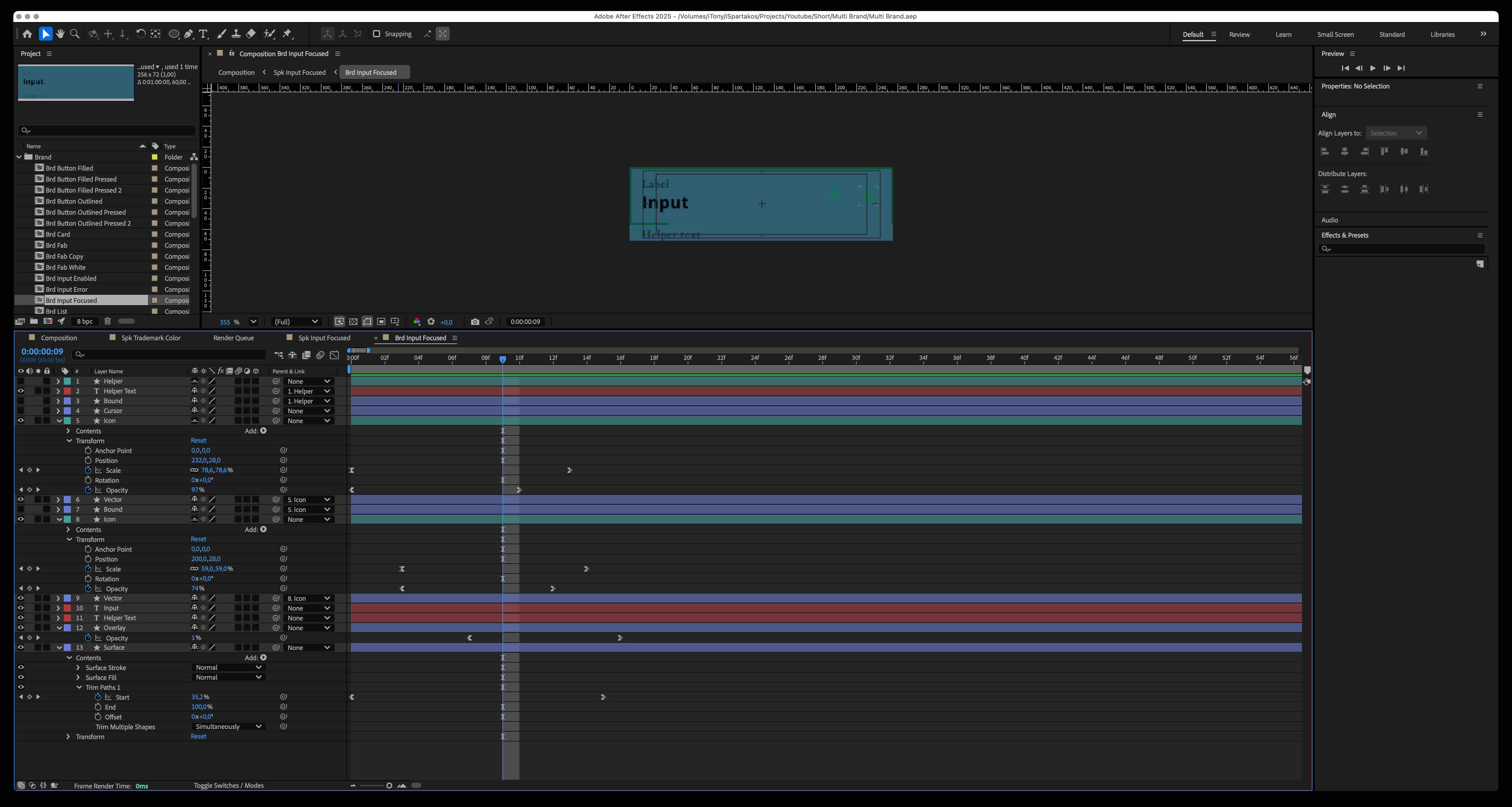
After Effects Screenshot. Within each element composition i do the magic tricks!
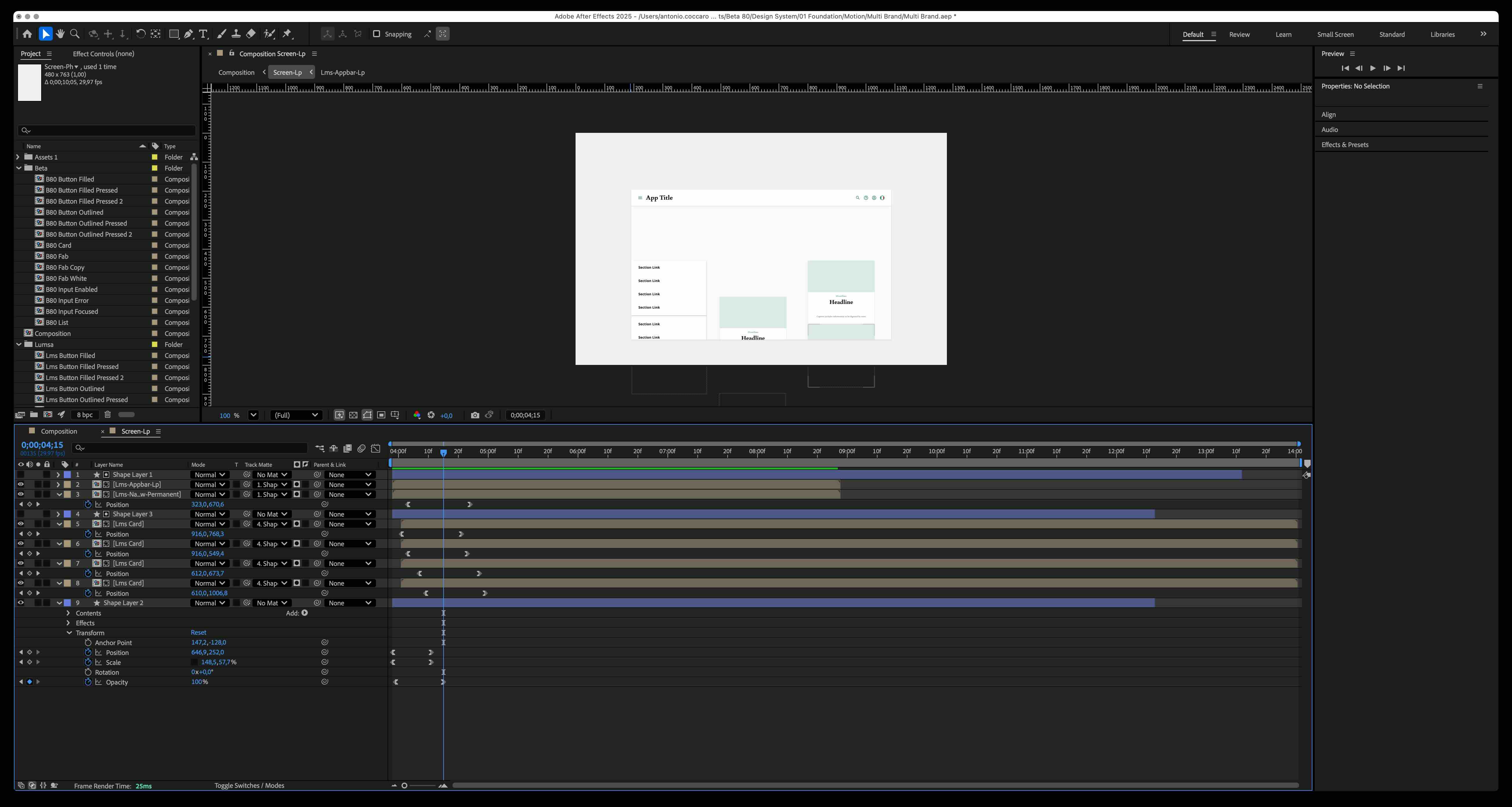
After Effects Screenshot. All the element move into a mobile and laptop screen to see them in action!
Motion Design specializes an application to indicate a relation among elements, possible actions and results of the actions themselves. It helps users's eye to keep the focus and it prevents distraction. Studies, research and applications in the field have demonstrated that animations make the interface understandable as well as expressive for the brand itself, which manages to integrate it as a pillar of its foundation.
Motion can be used to express visual meaning. Also, Motion is strictly related to Transition principles in order to function at its best.
Motion design helps to understand that a interaction can be feasible even in the smallest interactive moments (so-called micro-animations). Studies, research and applications show that animations make the interface not only understandable, but also expressive in terms of branding.
Elements on their own are not effective, unless we place them into a layout to create visual meaning like transitions and affordance 🔥 For instance a list of Cards within a primary content help users to navigate and explore in a way to help users make an easy scan of all the options available, and therefore to favor a so-called "decision making" 🧑🏻💻 Let me give you an example I did for the company I work for, Beta 80, using Nexus Design System. Down below I designed the elements to match one of Beta 80's clients, Lumsa University. Here elements not only show the instant brand swap, but also they move within a page template.
]]>Trinity
https://www.ispartakos.com/blog/trinity
blog/trinitySat, 05 Jul 2025 00:00:00 +0000It's an adventure to explain what UCD (User Centered Design) discipline stands for, now imagine applying it to the framework of work process! Then we wonder why we have shitty services, like most of things not working in this country. The best way I can do to express this feeling is using a scene from a famous movie (Trinity, with Terence Hill and Bud Spencer) which I edited with captions ... just to make it clear the classic scenario we Designers are facing every single day 🤪
Yes indeed, Innovation takes time on regular basis, alotta time if bad habits are notoriously difficult to break
]]>Resolution
https://www.ispartakos.com/blog/resolution
blog/resolutionTue, 21 Jan 2025 00:00:00 +0000I clearly remember when CSS came out with selectors MediaQuery at the same time Html5 was put out, may years ago (am I getting old?). Thanks to MediaQuery, FrontEnd Developers, included me back in time, could operate in a such way to detect screen resolution and even their properties like Aspect-Ratio, Retina or DPi. Doing so we finally could break free from strategies like WURLF for device detection!
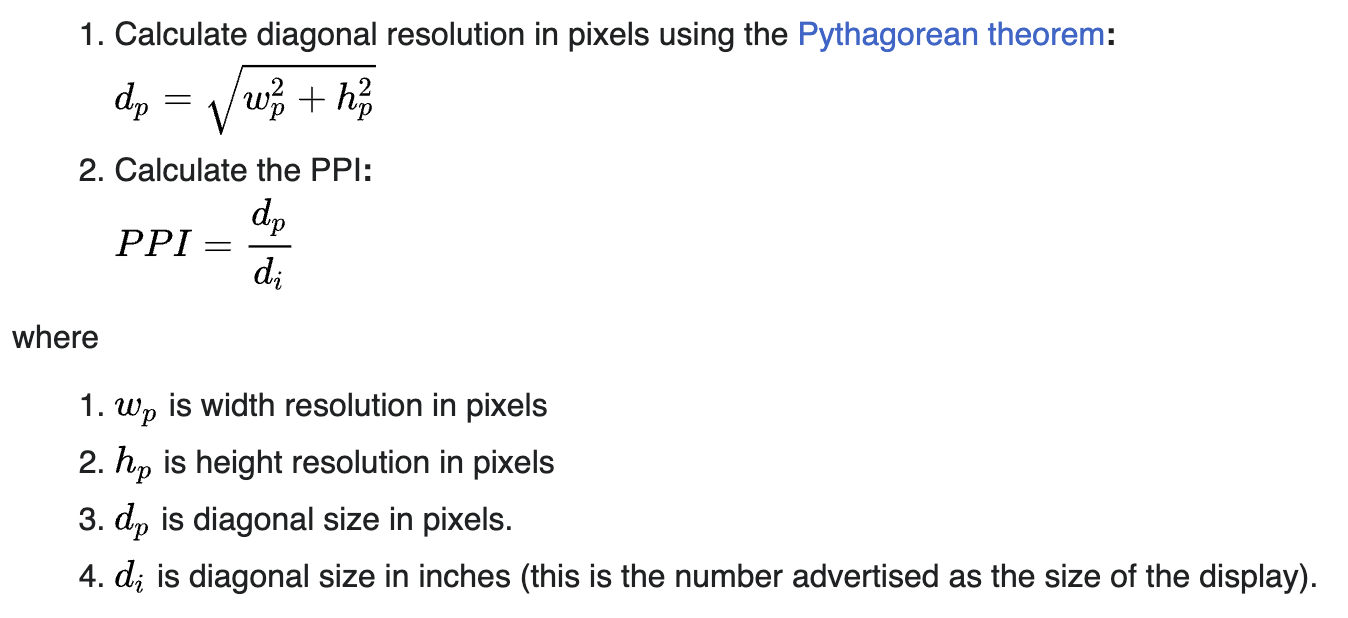
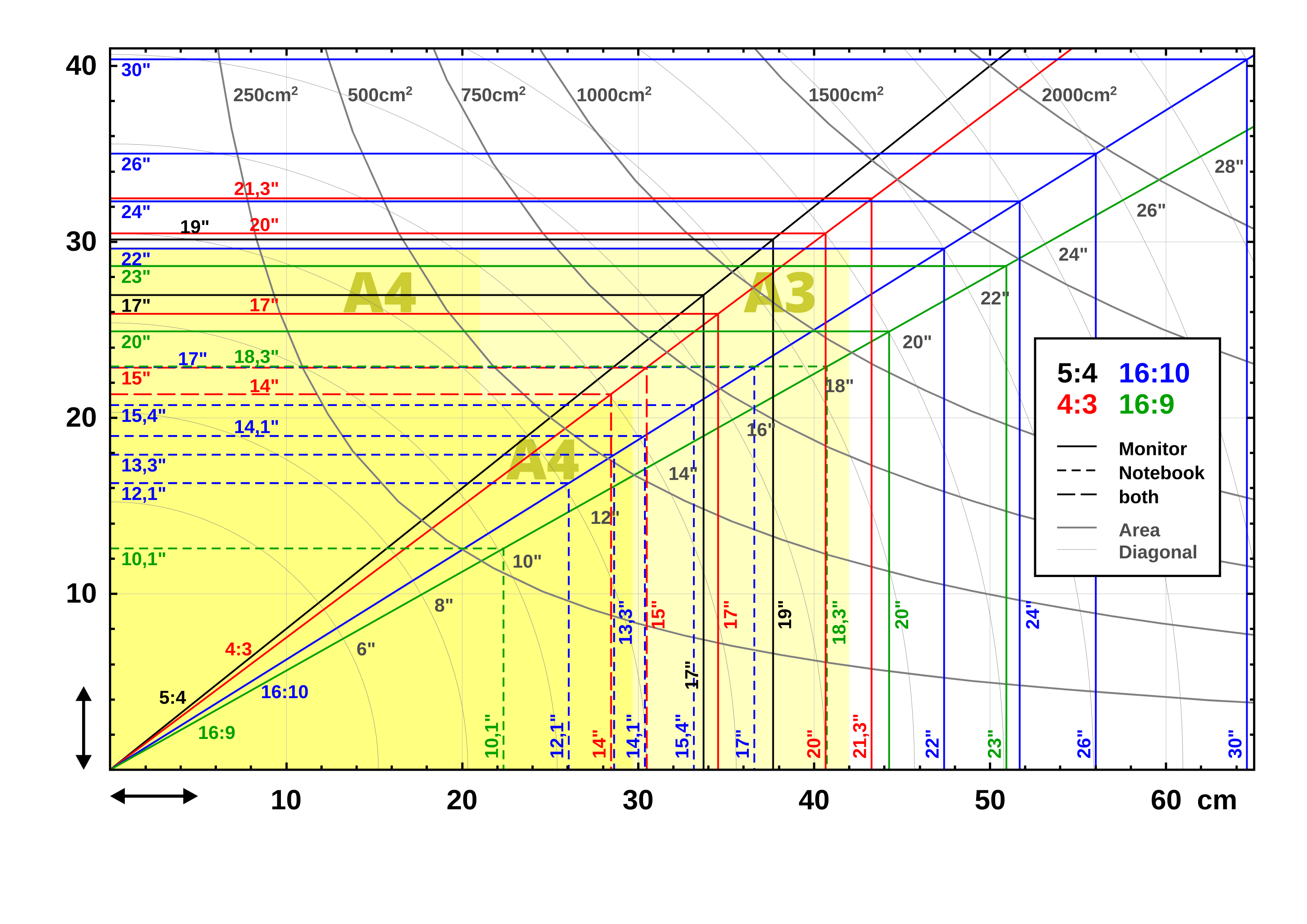
Pitagora Theorem to calculate a Diagonal
But wait, what's PPi stand for? It's an acronym for PixelPerInch and it's used to calculate the size of a screen. How? Simply applying the Pitagora Theorem. I know, math ... again. It can be easily implemented in Javascript
$(window).height();
$(window).width();
This along/or with CSS and you can get get the screen diagonal. As today normally, a Desktop starts at 17 inches , but remember that these values changes for technology and hardware evolution. Also, this is a simple tool online to find out what's your screen and device properties.
Statistics abouit screen Diagonal, as today
Matter of fact it's critical to start form the Design Foundation, before coding. What do I mean? Statistics, like researching the most screen resolution used nowadays.
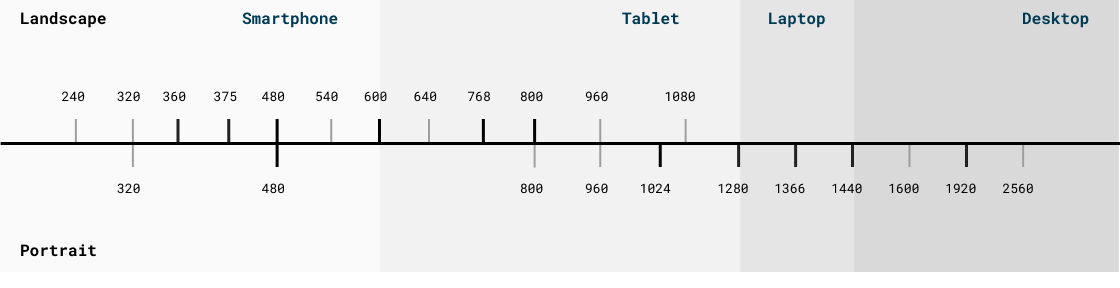
The exposed viewports are a default, useful for the heuristic evaluation of the product and they should be the standard of development process for a about 5 years, enough to cover the historical need of the user relationship and hardware advancement. I designed the following image that shows Viewport range and their relative Breakpoints, based on international statistic datas reported in 2024.
Resolution spectrum. Maybe in the US, but in Italy TV screen are not taken into account that much, yet!
These values could change depending on the real needs of the destination Brand, as long as objective analyses are carried out in the field within the latter through Google Analytics or Dynatrace which highlight the use of desktop and mobile devices, browsers and related browser versions, operating systems that end users make of the product. I could apply this strategy for the Cattolica Brand, and it turns out to be very useful for understanding how to proceed in these cases, that is, once the real perimeters have been identified, these should be the place where to concentrate and employ more work time.
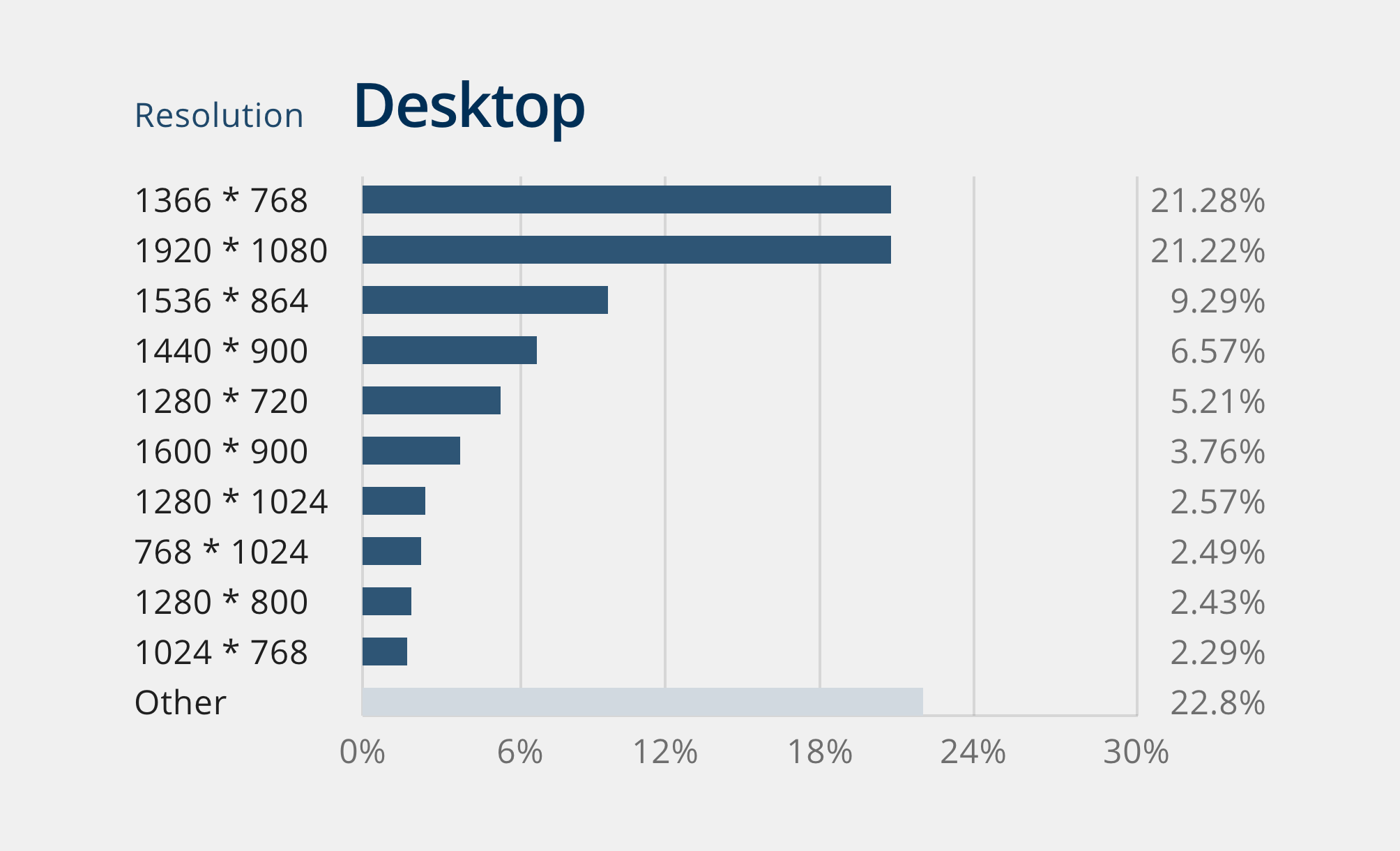
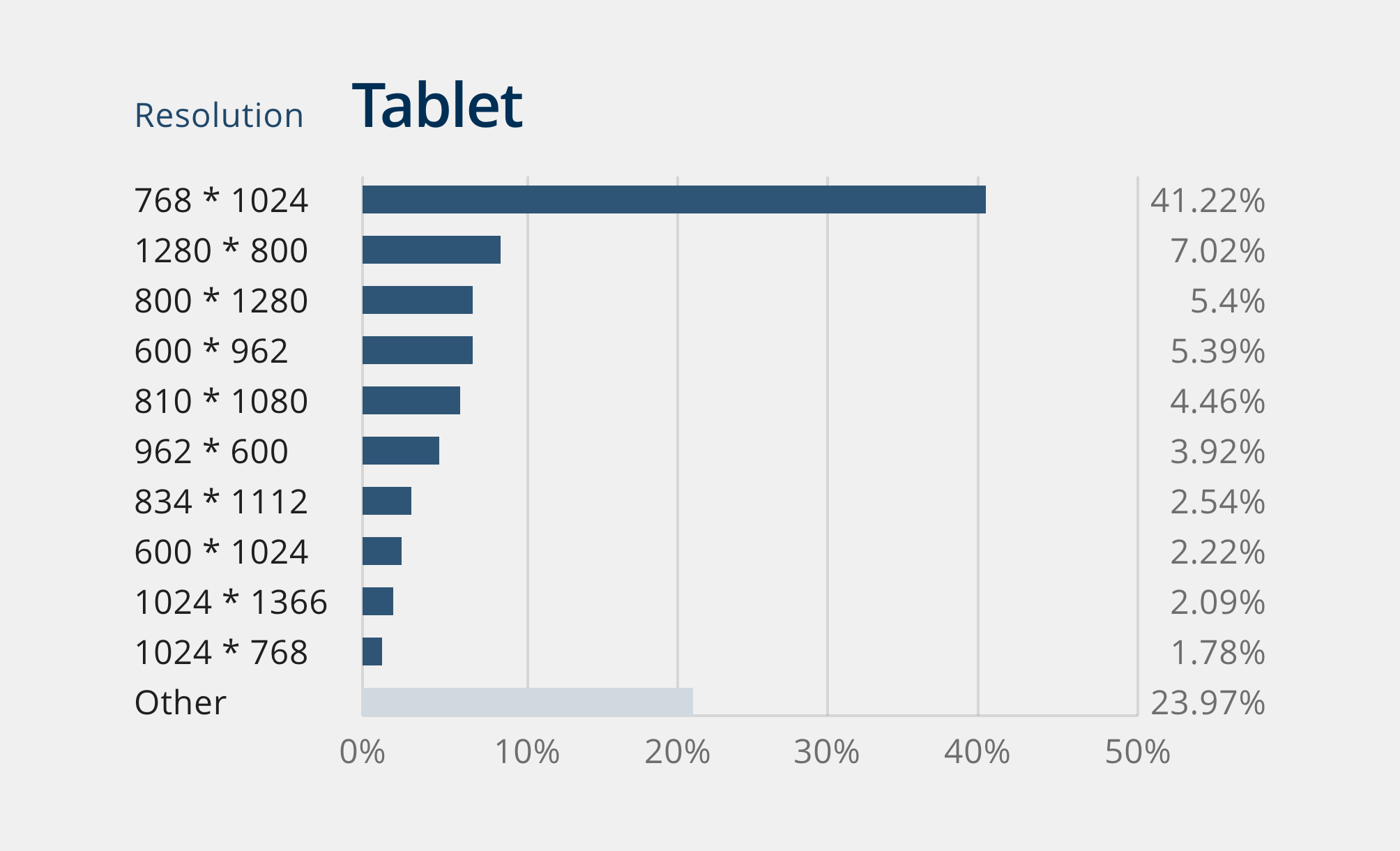
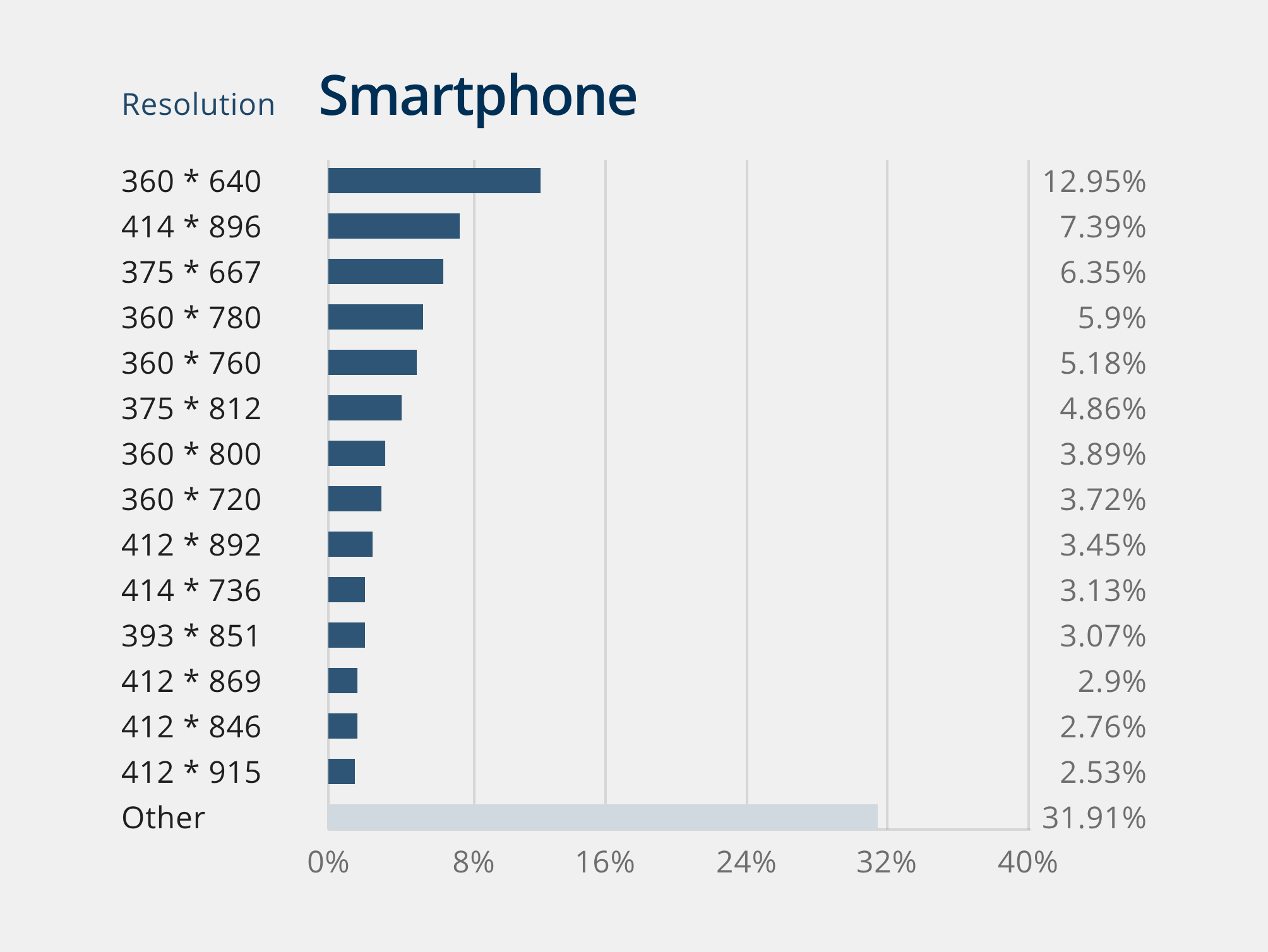
However, the entire set of the above values must be considered for all breakpoints without any exclusion, since for technical reasons it is necessary to intercept the unknown dimensions of the browser which could change anytime for user decisions wether it's a responsive or adaptive. One I've got the final research results, I designed a chart that summarize all, like so:
Resolution for Desktop ViewportResolution for Tablet ViewportResolution for Smartphone Viewport]]>Street Art
https://www.ispartakos.com/blog/street-art
blog/street-artSun, 17 Mar 2019 00:00:00 +0000First of all, let's give a big round of applause 👏🏼 to these people, Murisicuri, for letting this happen. It's a cultural association made of 19 proud tourist guide with only one clear goal in mind, make the Street Art possible in the city of Rome. Despite of different opinions in the neighbourhood, they succeeded. Yes indeed, it took alotta work to get to this point as mentioned by one of them. To me, this is one of the most memorable and down to earth event that has been in all the time that I've been here in Rome since 2008. I'm so thrilled that it took off 👊🏼 Well done, this is what I mean by true definition of keepin' it real!
Last but not least, one of the artists involved in this project ... live! at the moment people were visiting the area (just like me😃): Alessandra Carloni and Alice Pasquini. Glad to see that women still fight, despite all. Thanks for putting this art out in the world. That's the way I like it!
Som of these Graffiti talk about the Second World War, others share stories related to that Area (for instance the barber shop where the famous actor Totò used to go), and so on (I took videos of that great journey, see below!). What I'd like to say about all this event (and hopefully others to come) is that I'd like people to just keep a firm grip on what really matters. As i come from an artistic background, I can't help it but pointin out this quote by Ernst Fischer who said once:
In a decaying society, art, if it is truthful, must also reflect decay. And unless it wants to break faith with its social function, art must show the world as changeable. And help to change it
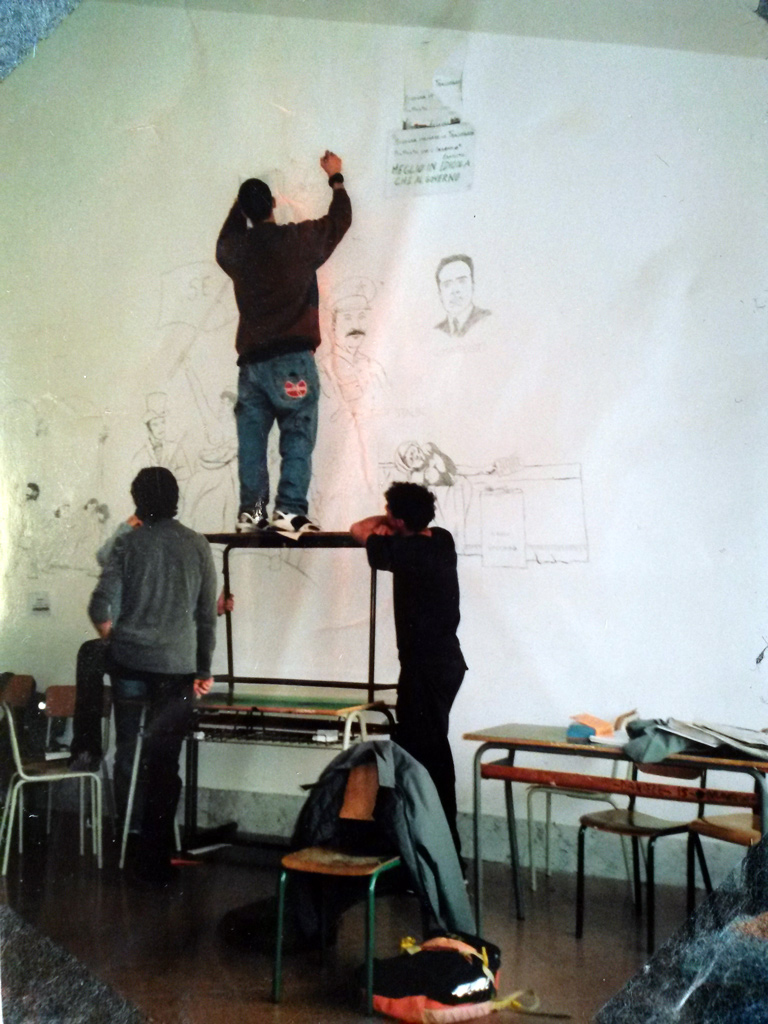
Sidenote, kinda remind me, back in 2004, when I used to paint the walls of my high school
with famous art history painters' reproductions by using a pencil, without any permission at all (in the end, even teachers appreciated)
Speaking of dreams, I wanna give a big shout out to all the kids out there asking themselves how to fulfill their passions: look at these ladys and boys making the most out of their artistic abilities. You can do it as well, never give up on your dreams! For real though, you never know what's coming at you at the corner. Take me for example too. I was soldier in Air Fore Academy once, when I decided to move to another Academy ... of Fine Arts!
Me balancin' and paintin' at the same time in classroom [it was supposed to be a gym class], at the age of 18
]]>Venezuela Crisis
https://www.ispartakos.com/blog/venezuela-crisis
blog/venezuela-crisisFri, 01 Feb 2019 00:00:00 +0000Bad news spread, I'd say! So you hear these italian uncultered swans talkin all that jazz - "hoorra to Chavez! He was great!" ... 😒 And I go like: Maaaan, SHUT FUCK UP! 🤬 You don't know shit about the country I was born and raised (I'm the 3th generation). So I like to give a message to these morons out there — yeah right, easy talk, being a fake communist while you're living in a capitalist country, isn't it? Now, get your ass in Caracas and try to make a living. Let's see what happens. And by the way what is this all fuss about the communism? Really? Are we still talking about it? We barely entered the new century and we're already heading to the third industrial revolution. Get a chance, shall y'all?!
None of your business! Morons like these folks giving public speeches can be dangerous meaning they can mislead one, two, thousand, million of other people's sense of reality, resulting in a massive misconception and, as consequence, giving more power to crazy dictators 😔 like ese pendejo coño'e madre'e Maduro! Words can be powerful
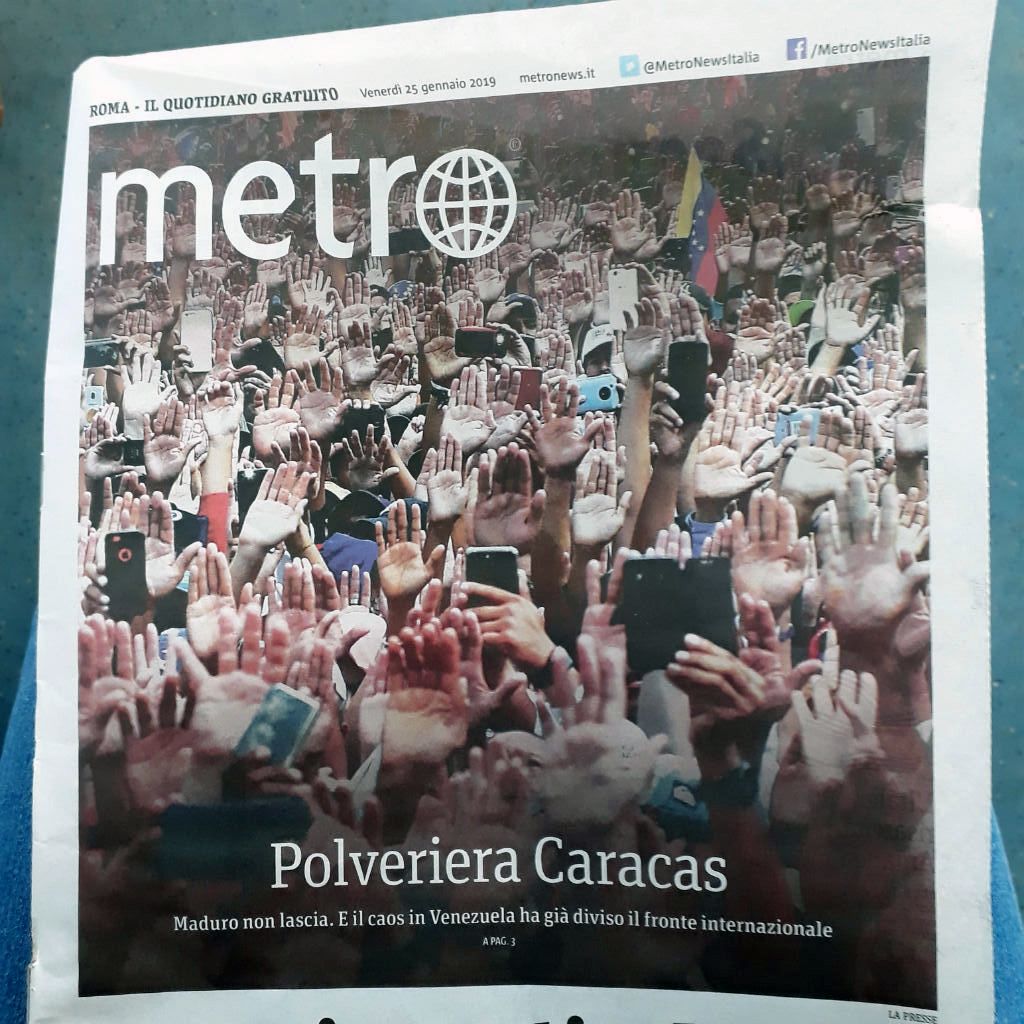
Metro, a local newspaper, city of Rome
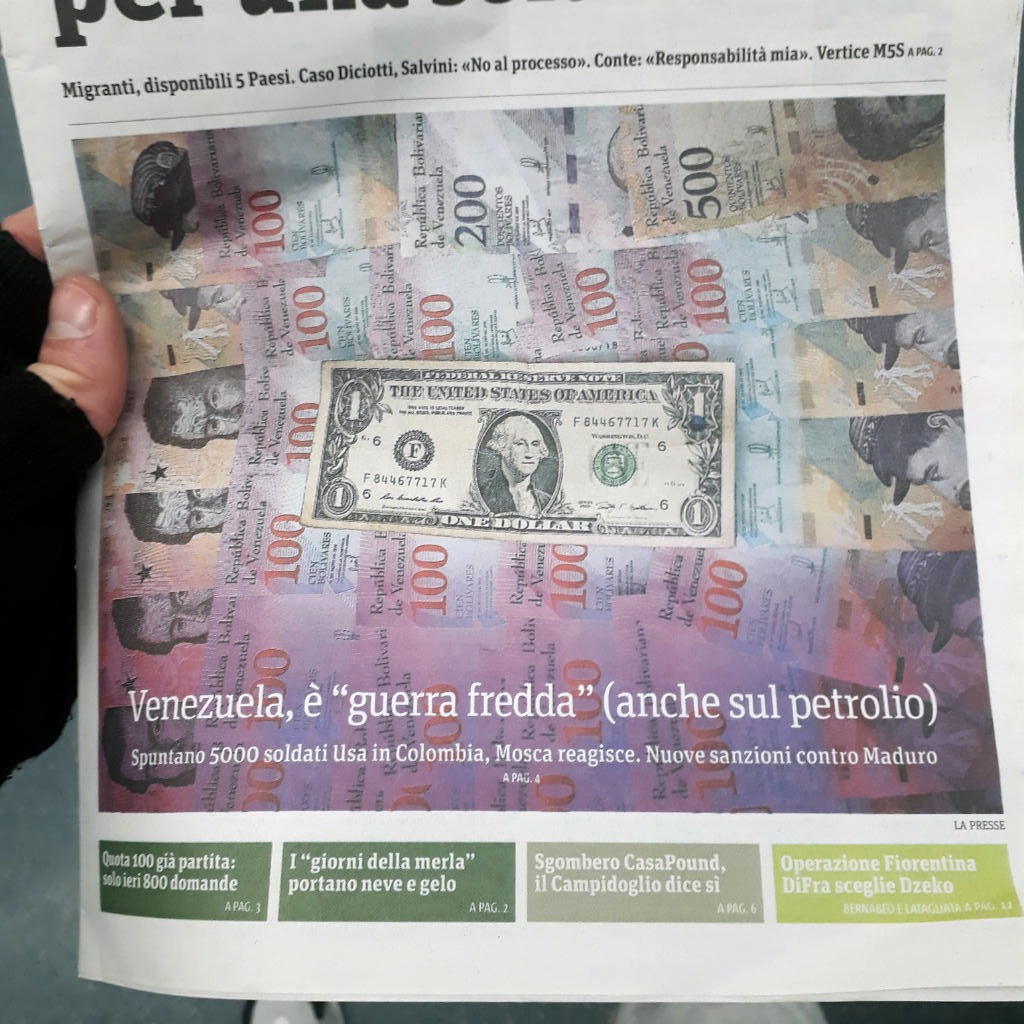
Another article speaking of the crisis
This is the only reason why I always decide to speak out loud in order to let people know (at least the close ones) the real facts, everytime the crisis in Venezuela is included in a conversation. Hey, I ain't no politician at all, but I do it for what my family, migrant workers, did what they did by bringing their dreams and abilities during the last century, starting from my grandfathers under the ruling period of M. P. Jiménez, later on my parents, uncles, aunts (either from my mother/father's sides) as democracy came up along. Doing so, they gave life to that country.
Sometimes I like to think myself — thanks god they removed my grandfather's anthem of Caracas, as it used to represent a generation of honest people for three generation! Also, I truly believe that I speak on behalf of every venezuelan person either spread all over the world or still trying to escape the inhuman condition of the country. Yes indeed, I speak not only for the hard time my family and I had to face right after leaving the country in the 90s right after C. A. Perez presidency, but also and most importantly for my relatives and friends still surviving (not living) in Caracas, as a criminal, N. Maduro, is perpetrating inhuman abuses.
I said once. I repeat it once again, I ain't no politician at all. I may say that every form of society ever known until today has failed (communism in the past, even capitalism as time goes by). At presente a solution must be given, of course (ideas like the Jacque Fresco's Venus Project sounds like a solution so far). I'm not even saying that the poverty issue in Venezuela was well managed during the 80s and 90s. I may be reading books like this one, besides mass media misleading informations. Still, I ain't no politician, nor an opinionist nor an history thinker. But I speak in full knowledge of the facts
With this being said, I must admit that I enjoyed hearing Pier Fierdinando Casini speech at the Italian Parliament, a few days ago.
Hopefully this gave a better understanding of the South America scenario, once for all.
]]>Tiero Pezzuti
https://www.ispartakos.com/blog/tiero-pezzuti
blog/tiero-pezzutiWed, 02 Aug 2017 00:00:00 +0000
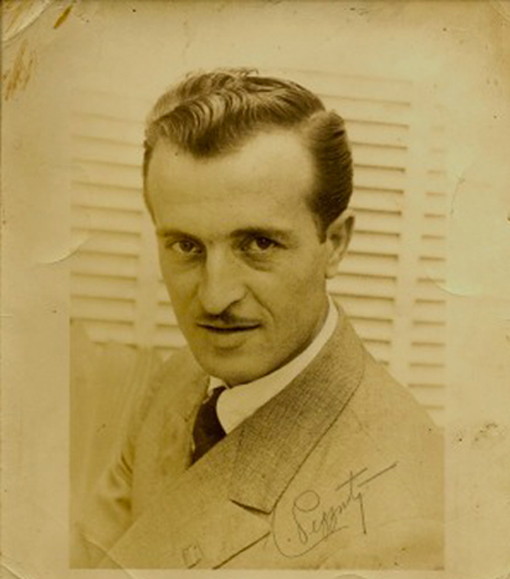
You were born and raised in difficult times, when the planet Earth was facing the Worlds Wars.
In fact, your family like the rest of my family (both on my mother/father's sides), spreaded out all over the world in order to earn a better living in other countries such as Venezuela, the U.S., Brasil, France, Spain and South Africa. As time went by, they became more numerous with the result of interesting cultures mixing until today. Yes indeed, we're migrant worker. Yet, we are originally Italians and it turned out that our home is the world itself, today.
We exported our abilities all over the countries, cities and even small towns. Like you did with your art, as great professional musician. In fact, your went down in history for being the composer of the Anthem of Caracas and author of many others music performances of yours. Along with your spouse Liliana, you succeeded where everybody else would never think to make it.
Local News TV, Caracas, talking about Tiero Pezzuti, few years ago.
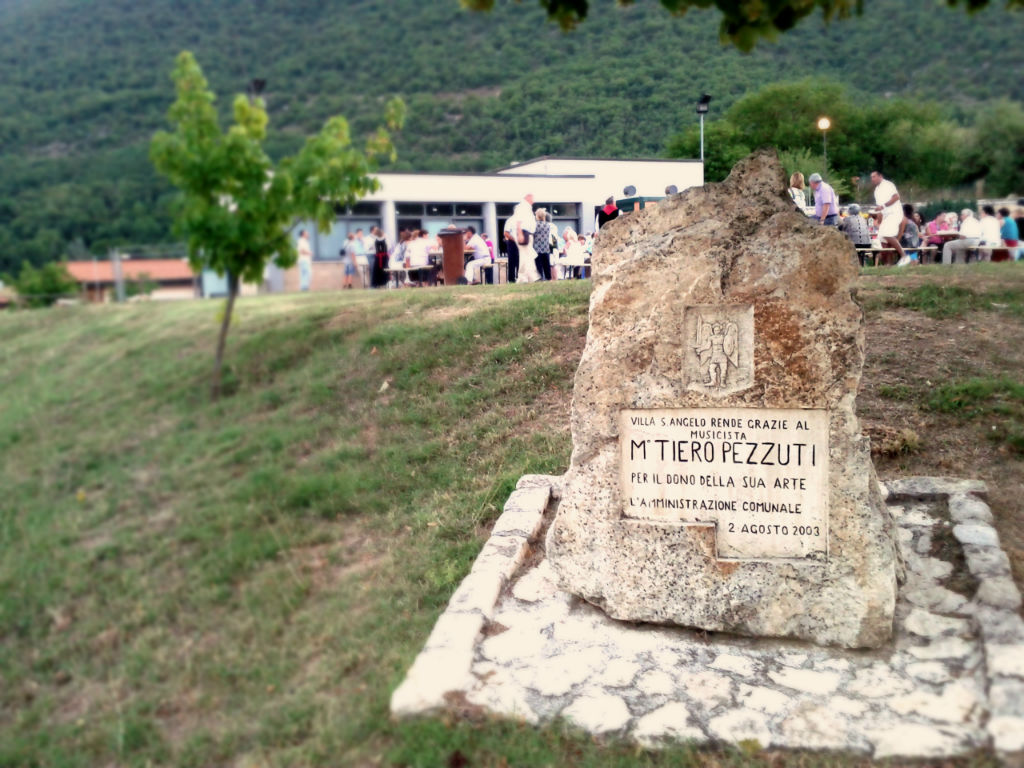
I'd like to thank everybody who made this possible in the town of Villa Sant'Angelo near by L'Aquila, Abbruzzo
Next, I came along representing the 3rd italian generation born in Caracas, the city where the latin rhythm used to make people smile. Today, if you were here, you wouldn't be happy to hear these bad news coming from Venezuela. Here I was raised in a extended family spending most of my childhood with you, dear abuelo. And I'm grateful. I keep very good memories of the time spent toghether.
Proud of being part of this family. Proud of your daughter, Rosella, following the path you created long time ago with alotta work. People remind you. We do. I do.
]]>App Style Guide
https://www.ispartakos.com/blog/design-system
blog/design-systemSat, 01 Jul 2017 00:00:00 +0000In fact the design approach in Italy seems to invest too little and as consequences there is so little gain that it would not be worth the effort at all. Maybe these teams always seem to be struggling to ship work they're proud of under deadlines that always feel too tight. But something is missing. I could feel it, deep down in my bones; there must be better way to build product. Thus, based on my past experience as a designer, I’ve naturally arrived at a design-centric solution: I need a design system!
In fact, years ago, I envisioned something that our overseas fellows have already envisioned many more years ago as well (Design systems, back then “component libraries”, were used throughout the 2000s, and even at least as early as Dell.com’s library of “atoms and molecules” in 1999 created in partnership with Frog Design).
So far I came a long way. Having spent the majority of the past few years thinking about how to design, build and present design systems for service products (see case history ), I figured I’d share some of what I’ve learned along the way. Let me show you how creativity is the production process itself to make a better product. (I'm speaking of the design process only, user research aside)
If you're posing like this guy up here at work all day long, then you know you're good to go!
It’s no secret that designers love a good UI kit. However, beyond just putting together toolkits and style guides, it seems that recently there’s been increasing focus placed on designing systems intended to tie whole products together. Big companies all around the world are building in-house teams focused specifically on designing systems. People are starting to realise the importance of systemic design. This is encouraging, especially in Italy. In fact, in most companies the delivery process from the concept to the user is so disjointed that the products feel nothing like what the designers first intended. The signal (the concept) fades as it goes through perturbations (inefficiencies), and ends up into the product in a much lower fidelity. Such inefficiencies have a massive impact on the company’s ability to ship high quality products, which has a huge business opportunity cost.
No doubt, I get asked about design systems and, whenever possibile, I produce a very simple version of it. I'm saying simple coz there's no much interest in it yet. But who knows, maybe some day we’ll have a design tool that doesn’t assume we’re starting from scratch every time we open a new document…? Starting with something like this one, zeplin or som design version control tool like adobe-cloud or even better Craft plugin for Sketch and many many more I can't mention here
WHY
The best products are built by teams with great communication bridges between designers and engineers. Whether you’re one or the other, at the end of the day… we’re all shipping software. As I already mentioned, when a Design System is invited to the party, communication is even better. It will bridge the gap between the design team and the engineering team.
A design systems must get into the designers’ shoes, and have a feel for what they are trying to conceptualize. At the same time, Design Systems need to understand the engineering requirements and define methods that will help shipping and scaling the design system. In a way, a design systems is the key translation between these two worlds.
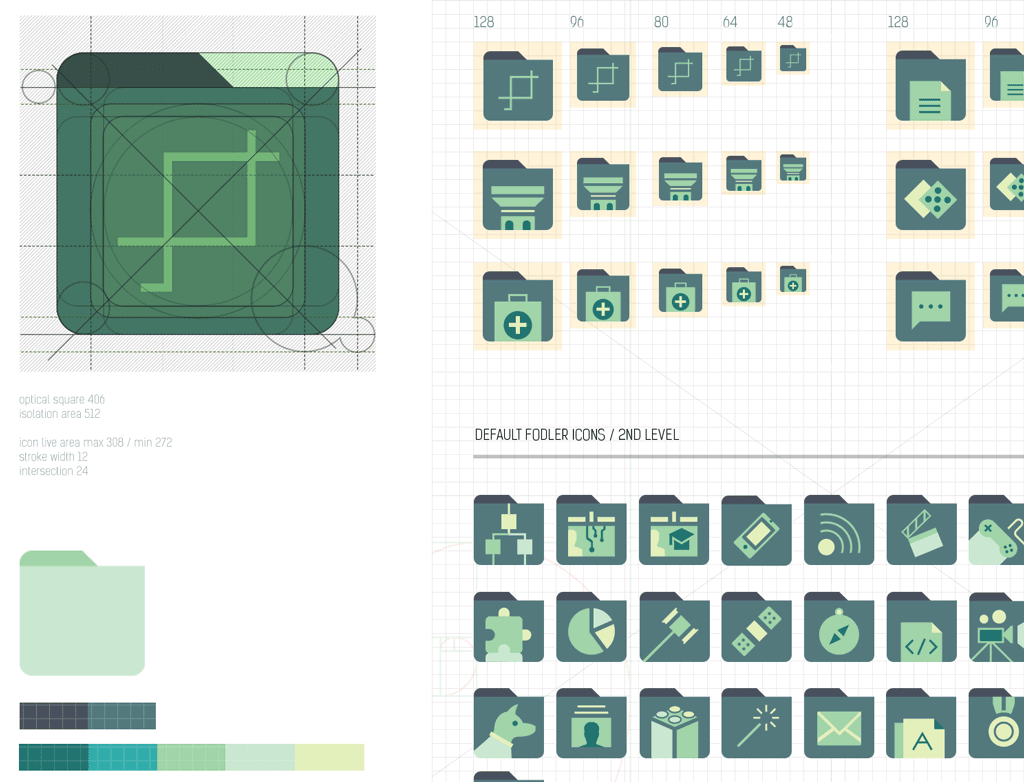
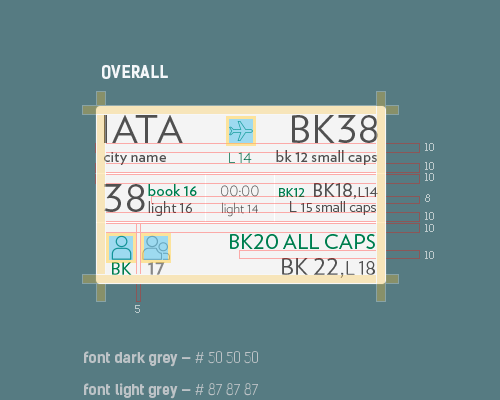
Sample of folders metrics I conceived and created for Cetaqua.
As a matter of fact, building a design system is extremely useful. It is more than a framework, UI toolkit or component library. It’s more than a style guide or set of code guidelines. It’s even more than the sum of those parts. A design system is an evolving ruleset governing the composition of a product. Never fit the content to the design, the system must work with any content. I don’t just design for the best case scenario — I account for all scenarios
WHAT
Style guides, pattern libraries, design systems: all help normalize practices and design patterns around a common language.
Design systems can start with: naming colors, objects, conventions, components… down to documenting the finest details of the experience, such as animation timings or the roundness of corners on form elements.
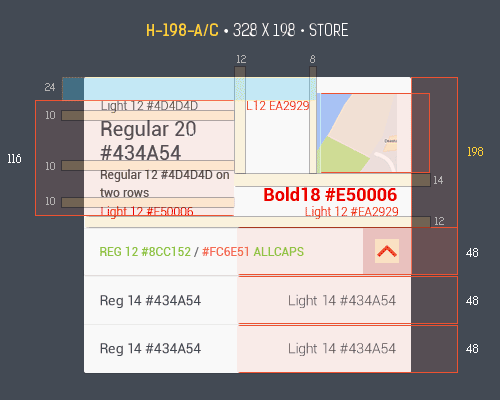
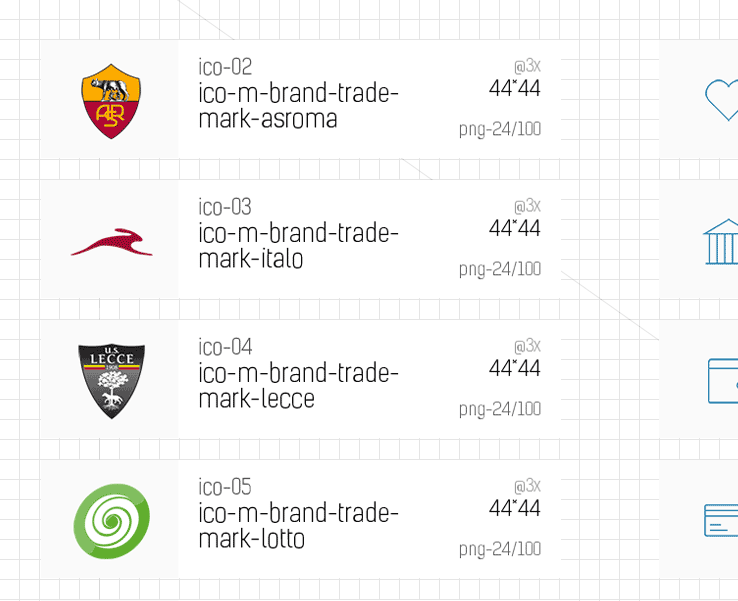
portion of metrics I produced for Lottomaticard. Clear as crystal
common metrics I produced for laFeltrinelli. No misunderstanding
metrics applied to Alitalia cards. As part of the report definition, I can specify the metrics to include in the report as a parameter
A good design system helps make design decisions much faster (e.g. “what color should a call-to-action be”). Designers can then spend more time on user flows, and exploring multiple concepts in the same amount of time. A good design system also helps engineering teams refer to a single source of truth at the implementation phase. This is good for consistency, as all call-to-actions, for example, will look the same across screens.
Some design systems also ship patterns using code. These design systems can prove to be valuable from the beginning of the concepting phase, to the prototyping phase, down to the implementation phase. It’s a good sign for both productivity and fidelity when a company follows that path.
I've been watching the prototyping tools evolving since 2009. Long time, no talk. Check out my post on wireframe 'n' prototype tools to get a better insight
Yet, some design systems don’t get the love they deserve and end up being glorified lists of patterns, afar from production code. That’s because a partial investment from a few designers and developers is not enough: a design system isn’t simply a project, it is a product serving Products (quote by eightshape )
For a design system to show sustainable value at scale and at all phases of the delivery process, it needs proper planning, user research, and methods (and lots of love!).
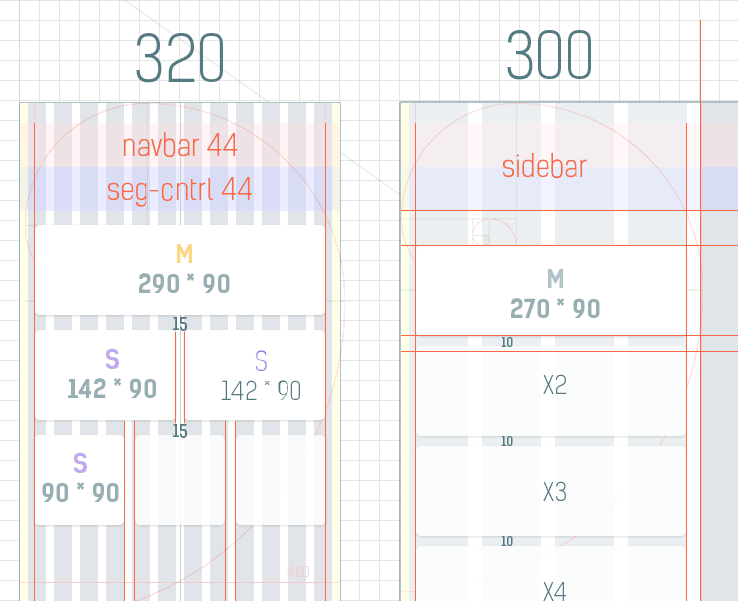
info design showcase I conceived for Lottomaticard. Every detail a developer needs right away
portion of info design taken form Lottomaticard. It's a grid layout exposed. No doubt developers can get away with the implementation
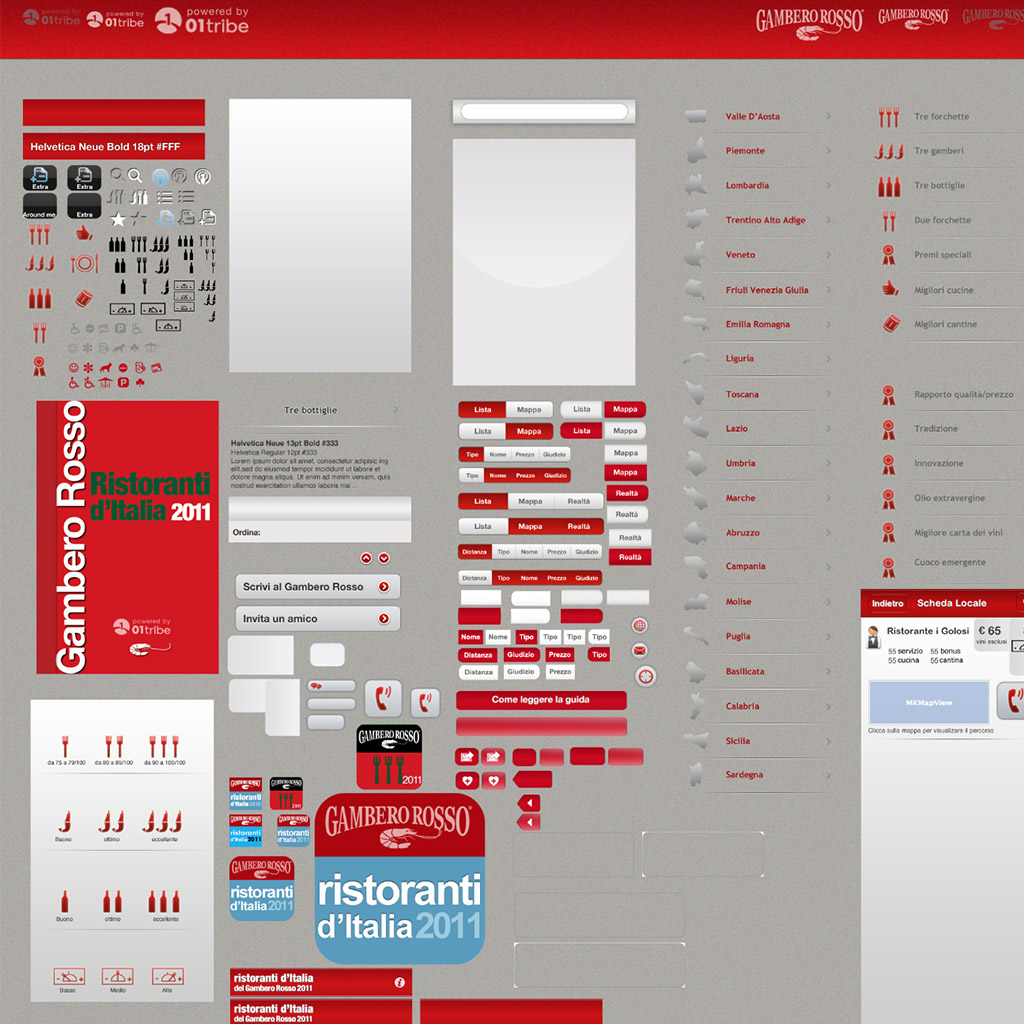
Other portions of Micro design system I started off with, years ago in 2009
HOW
When creating a design system it’s important to be mindful that you won’t be the only designer (or developer) who works with it. Literally documenting the design system was the biggest challenge for me on every project.
Normally I create annotated specs — typically these are a series of .psd or .sketch files, to accompany the design(s). A good example of this approach can be seen in my case study down below (see case history at bottom page). While specs can contain every detail imaginable, things can still be missed or misunderstood when a new or replacement designer steps into your shoes.
a character I conceived to attend users while reading the document
briefing master components of Cetaqua web application
I started out reading and researching how other teams had done this. Fortunately the Internet is full of answers for this, and many companies have made their documentation public.My initial goal, having seen so many stellar examples online, was to create a website to document the system, specs, showcase example uses, and specify guidelines for all patterns and components. It would act as a quick reference, or a bible to study in detail.
However, I didn’t want to be held back by the design, build and time constraints of creating a website for this — the only reason to create a public, branded website for this would be as a ‘pride project’ or as a resource if we open-source the system (I did it anyway - interactive ux app ). So to get started I simply created several templates file among Illustrator, Photosthop and Indesign (Google docs as well why not, not to mention the useful tool by L.Benazzi, Ux Map for Axure ). As the document grew, I realised these templates did exactly what I needed it to.
documenting the interaction of Lottomaticard app in the form of wireframe
covering the wireframe of Lottomaticard app, providing readers with a legend-index
As the documentation was taking shape, design needed a way of efficiently communicating and tracking the build and integration of the system to the developers. I heard of designers choosing to use GitHub in order to engineering their design system. They created ‘issues’ for specific components — sharing previews of the design, specs to ease the development process. This way engineers can tackle these bitesize chunks one-by-one as they’re ready, they’re held accountable, and nothing gets missed! However, I'm aware there are online tools out there ready to accomplish this critical task like Zeplin and other design version control tools on the market, like the tremendous Craft Plugin made by Invision for an incredible software, Sketch (version 44 updates with constraints and overrides. Great move!)
But, what if your project has to be hand over somebody else? I mumbled for a while, then I realize the installing solution could be just great ( tools on Packaging ). A package is a bundle (with a .pkg extension) which contains an archive of files to install and information on where to install them. It can also includes Read Me, License documents and scripts to run before or after the installation. Remember google docs I mentioned before? Even tools like Notion are great companions to achieve this goal.
the background picture displayed in the Installer.app window can be customized by the package
Developers and designer should get along and understand each other world techniques (with proper limits, of course). This would reflects in the production process, and the quality of the system. Via this documentation I like to expose designers to coding, encouraging them to understand how things work. From a ‘learning to design with the system’ point-of-view, it helps to explicitly see and learn the values, spacing and naming conventions in the build. It also helps to bridge the gap between design and engineering.
Last but not least: One of the goals of the design system is to get designers, developers and product managers all speaking the same language. We can help to achieve this with consistent, semantic naming conventions we’re all familiar with (in the design and code), be it coding variables, font styles, colours, UI patterns and components, templates or page names.
If you don’t start off on the right foot, you’ll trip the whole way through. My folder structure helps keep me organized, and gives me a way to share design resources with various parties (asset, reference, marketing, dev, etc.). You may want to create an automation to create all of these folders for you and you can get it here for free, New Design Project Automation Tool. Also you may want to keep your finder organized as well. You've got covered on this too, check this out, Divvy.
Then time would fly .. and i'll still know where to click like everybody else who has never get into this project of mine
Order is a priority either I'm working on common files or design files ( e.g. - Etiquette ). I’ve naturally arrived at a naming-centric bullet-proof solution as the projects I work on are likely to host more than one platform in the future (mobile and web application)
]]>Spinning Ring
https://www.ispartakos.com/blog/spinning-ring
blog/spinning-ringWed, 19 Apr 2017 00:00:00 +0000
For the uninitiated, FramerJS is a Javascript framework for prototyping motion and interactions. That means it’s a set of Javascript functions that will make your life easier when you’re prototyping. You will need to know the basics of programming to capture its full potential, but the Framer team has created Framer Studio to assist in the creation of these prototypes.
Anyway, you shouldn't be afraid of coding. The most important thing to remember is that you do not have to know everything to begin. Start with the foundations of a programming language and aim to continually improve. A key thing to remember is that in programming, there is usually a smarter way to solve a problem and chances are, there is documentation to prove it. Even the most advanced users pick up new tricks from inspecting other people's code ( I feel lucky, as I already studied these "basics", while sitting in the back of bus going to the Arizona State University in the beginning of this century :P ). Go check these pages to get a comprehensive view on its basics and coffeescript programming
Framer is not for production. And that’s a good thing! Framer isn’t an attempt to accelerate or bypass the development process. Where some designers may write HTML or CSS to facilitate accurate front-end development, Framer can be seen as more of a communication and validation tool. Considering that Framer produces very messy code (a slew of divs with inline styles), very little of what is written in FramerJS will actually be used to create the real product. Some motion parameters may still be relevant (delay, easing, and timing) but very few lines of code will still translate to the development process.
They say Framer is for communication. This isn’t only true of Framer, it’s true of all prototyping tools. Prototyping inherently lends itself to answering questions, validating ideas, and proving concepts. Instead of describing animations to a developer (or watching over their shoulder), Framer empowers the designer to add interactions and motion to their prototypes, and more accurately communicate the vision of their design.
Framer prevents the need to recreate designs before prototyping. Framer Import skips the redundancy (like I always do importing Photoshop layers), and maintains the integrity of the design layers to facilitate quick prototyping. All of the artwork is preserved as it is brought into Framer, ready to be animated and manipulated.
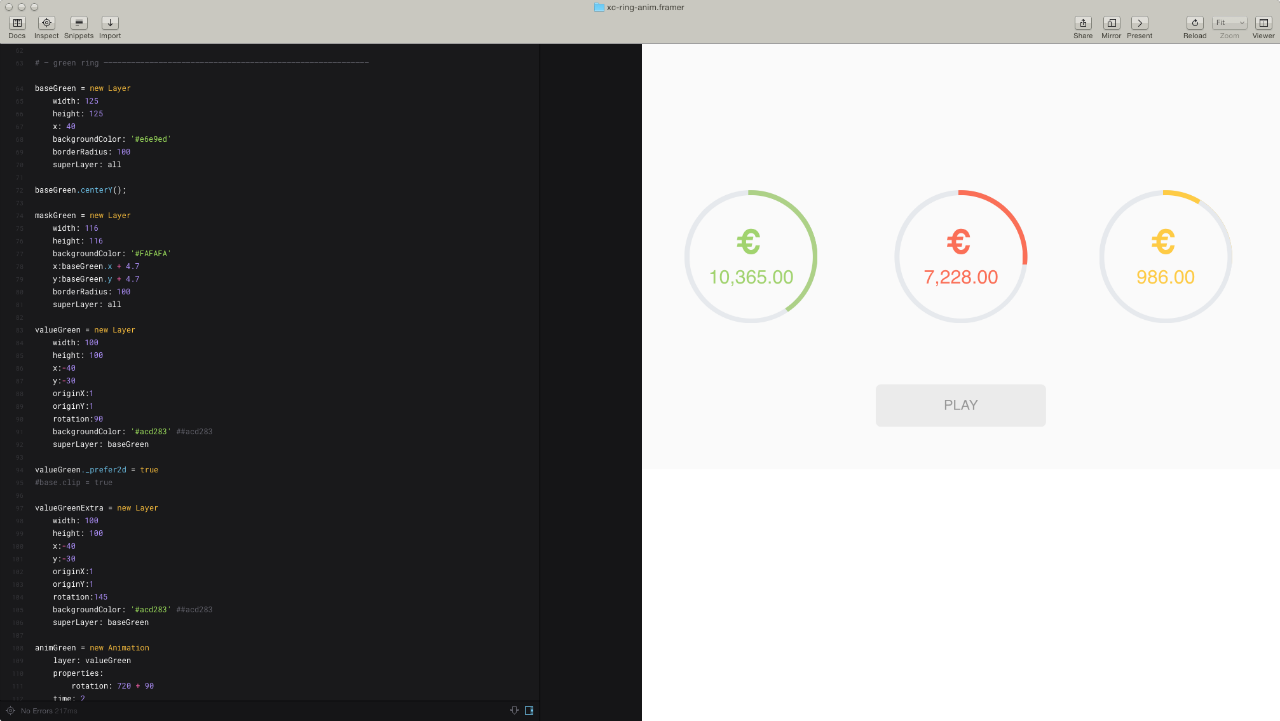
Many tools are leveraging drag-and-drop interfaces to mimic what would normally take complex code to produce. Framer is simplifying the code to lower the learning curve for creating complex prototypes. Neither approach is wrong, and both have their advantages. Framer is the future. Thus with so many prototyping tools popping up, I wanted to give Framer Studio a shot, years ago. When you first open the app, you are presented with a code editor on the left pane and an instant preview of the code on the right. This makes experimenting with the code pretty easy.
The ring animation tutorial itself. Code on left, final result on right. As you write code, ui blocks on right animate. Simple as that. I would say a new "what you see is what you get". And you can set the refresh interval according to your preferences
I've produced some prototypes along the way with Framer and they tend to be either long or short flows with many different or few states. Actually I'm developing a pretty rapid system for converting a Ui-design into a robust prototype by anticipating issues that usually occur later in the process.
Doing so, I often come up with different ideas while building Ui blocks all over the interface and today I decided to share this one of mine, a sample animation as a way of how you can handle an hypothetical a specific cirlce graphics inside an app prototype workflow with Framer. Believe me it makes the process really fast. So I took this animation outta project I was committed to, Lottomaticard and Imma show you down below (otherwise check it out at full screen here ). The goal is to visualize the money balance of prepaid cards in the form of a pie-graph ... Looks like a job for me. I said — eureka! spinning rings like spinning wheels, bro! They're spinning'!!!
CONCEPT
Before we go any further, I'd like you to put Photoshop and Framer aside and grab a pencil to focus on the art of sketches! Believe me, it's the best way ever to start off a project on scratch, for different reasons.
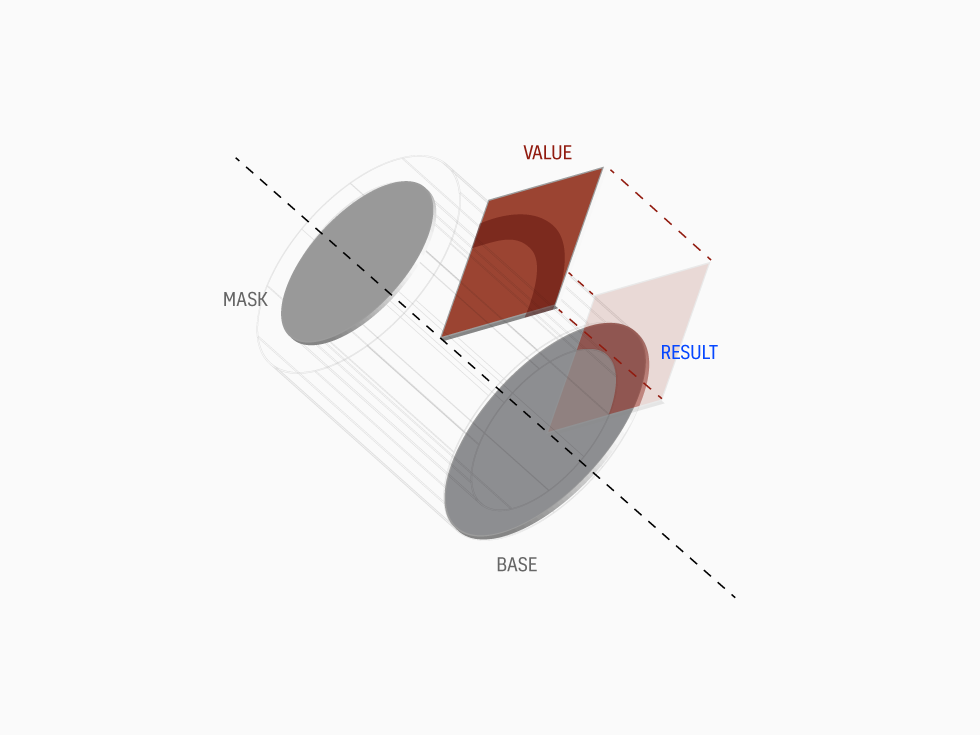
Think about it, you save time in the long run since the art of sketching allows you to paint your thoughts on the go. Thus, what's the trick behind this ring animation I came up with? Mask and Base are two circle primitives. The Former is smaller and it's set on top of the latter. Considering that the third layer, Value, is a square primitive (cropped by base), the idea gives the final effect of the ring with a portion colored . Got it? Let me show you below
I turned my sketch into an Illustrator vector file just to give you the concept behind the ring animation
Check this out, I created a quick 3D sample for demonstration purpose as well
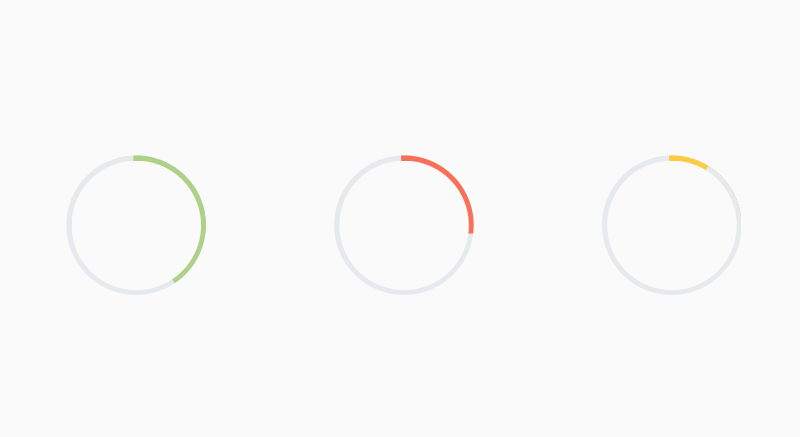
I decide to create three rings: green, red and yellow. Each one achieves a different results like any other pie-graph on any bank app interface you might run into. Red shows a quarter (the value itself), Green more than a quarter and Yellow less than a quarter ... but "Hey wait a minute" — you would say " If a quarter is represented by a square, how do you make Green and Yellow?" — Also you would ask "But if you’re going to code your prototype, do it like expert programmers would do with complex math calculation like Sine and Cosine". Not the case my friend, coz I'm not coding in the language of the end-product. This may be ignorant of beginner. I can’t code in Swift nor Java, dear designer (unless you're a developer too). My skills are limited to basic front-end Javascript frameworks, yet I still want to be able to create realistic, platform-agnostic prototypes. And framer allows me to leverage my knowledge of Javascript to create these types of prototypes.
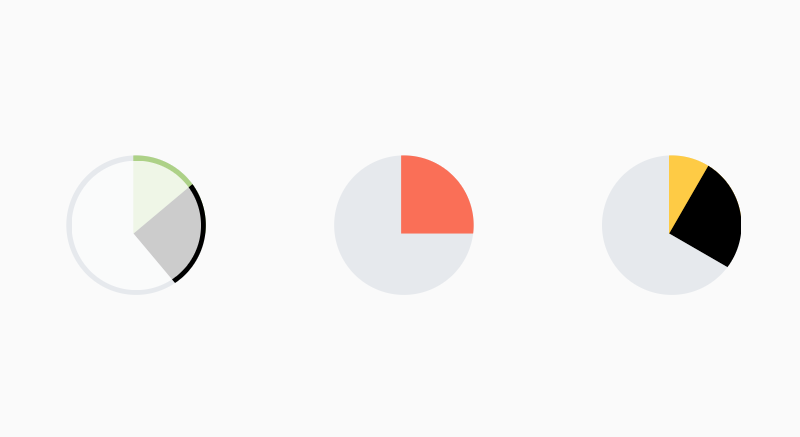
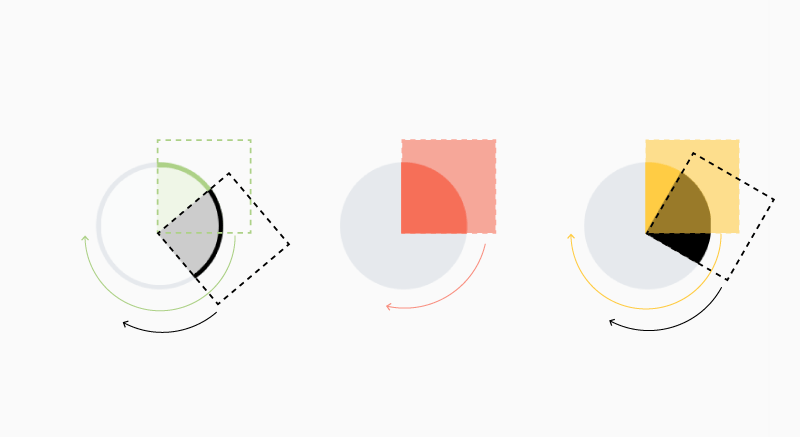
Back to Yellow and Green. My trick was creating another cropped square value (Extra in black color) and attach it to the first square as children. Considering the pivot set at bottom-left, I would rotate this Extra value to the desired degree, less or more depending on how much "value" I want to show. Remember this is prototyping, not the final real product. No need to make complex math calculations :P
final result as desired. Green, Red and Yellow ring
The black value attached to their relative "father-value"
Animation will occur on both value squares, as the black one is attached as "children" to its relative "father". Note a different rotation angle. I painted with black for explaining purpose, meaning that [a] Extra square for Green ring must be green color to fake more value — [b] Extra square for Yellow ring must be same color of BaseYellow layer in order to fake less value
ROCK N ROLL
There we go now. The fun part is coming. Coding my thoughts has never been much easier with Framer. Keep in mind that I'm not importing anything either from Sketch or Photoshop. No need in my opinion. Primitives like these above can be quickly reproduced via few lines of code.
As you can see coding process start off with these kind of thoughts. Think about it before you move on Framer. Once you have it down, go away with it. Let's kick in with the Green ring where valueGreenExtra is the black square children I told you about
As you can see the famous Extra square, valueGreenExtra layer, has the same properties of value layer (like color, I painted with black for explaining purpose), but rotated to my desire preference (55 degrees more than 90, then 145). Instead, Yellow ring would have an Extra square painted with BaseYellow color. Remember that I want opposite effect: less value. OriginX-Y controls the pivot I mentioned before. Superlayer links it to the base layer.
Now that you've just layed down your layers, focus on value the portion color that must be intersect between the base and the mask, you can go for clipping (crop) this value. As you might be beginner on Framer, let me introduce you to
valueGreen._prefer2d = true or even baseGreen.clip = true
Once you're satisfy with these settings, move on to animation part . Layer properties tells what layer has to be animated. Rotation according to it's position as well. And you're good to go!
animGreen = new Animation
     layer: value
     properties:  rotation: 720 + 90
     time: 2
     curve: 'ease-out'
     #delay:0.3

animGreen.start()
I've collected a bunch of Ui animations made by other talented Designers
]]>A Brief History of Animation
https://www.ispartakos.com/blog/brief-animation-history
blog/brief-animation-historyThu, 13 Oct 2016 00:00:00 +0000As Thomas J. Froehlich said — Animation can be described as the creation of the illusion of motion through a rapid sequence of still images. Although the quality of the original images is important, equally important is the quality of the sequence through which action, character, and story development are portrayed. There must be a coherent pattern to the action. A common story structure introduces characters, a source of conflict, the development of this conflict, a climax, and finally a resolution. But an animated story can also be more fluid, including the creation of forms or simple images, some interaction of them, and then a transformation or transmutation , such as a smiley face turning into a frown or dissolving into the background
Many types of animation exist but there is no common classification scheme to describe them. The Encyclopedia of Animation Techniques (1996) lists drawn animation and model animation, but there are also cutout animation, 3-D animation, virtual reality (VR) animation, and animatronics , to name a few other types. The hand-drawn or cel animation, mentioned earlier, is the most common traditional technique. Hundreds of examples of hand-drawn animation were generated by Walt Disney (1901–1966) and his studios, such as Snow White and the Seven Dwarfs and Bambi. Hand-drawn animation in pencil form and cels is no longer used much today. Drawings are made with computer software, and foregrounds and backgrounds are now generated through the use of digital files. Today we can tell that cartoons production is entirely 3D making.
The animation industry has definitely changed — e.g. Just to give you an impression: I started modelling and animating either characters and objects back in 2000...and the conversion was almost done, as the Newtek company launched the biggest 3D tool builder at that time (I started off with Lightwave 5.6).
As a matter of fact, major growth in animation productions started in the 1960s prompted by the growth of mass media, particularly with visual effects in films (e.g., Mary Poppins ) and animated cartoon series on television (e.g., The Flintstones ). In the 1970s, the growth of computer animation was facilitated by the invention of minicomputers, particularly by Digital Equipment Corporation's PDP and VAX computers. Because of cost and complexity, computer-assisted animation was still the domain of commercial companies.
While personal computers (PCs), such as the Macintosh and the IBM-PC, were introduced in the mid-1980s, it was only in the 1990s that their power and available software were adequate for personal computer animation authorship. The diversity of developments and inventions and increasing use of technologies for computer animation are presented in a timeline (1960–1999) in Isaac Victor Kerlow's The Art of 3-D Computer Animation and Imaging (2000)
First movie ever made enterily in 3d production back in the mid 90s
Not to mention that several software formats have been used for producing animation on the Internet. One of the first was Netscape Navigator 2's GIF89, which allowed a user to animate GIF (Graphic Interchange Format) images. It was not intended as a medium for full animation, however. Partly as a response to this, dHMTL (dynamic Hypertext Markup Language) was born. Dynamic HTML is a hybrid of JavaScript, HTML, and cascading stylesheets, but the disparity between Internet Explorer and Navigator platforms made it difficult to use. — Kepher, based on my Thesis at Academy of Fine Arts offers plenty of insight into digital graphics history and particularly into web animation.
When CD-ROMs (Compact Disk-Read Only Memory) became common, Macromedia distinguished itself with Director, a multimedia authoring system. I claim myself to be among the last guys coding and animating with this tremendous old school tool like dvd menus and videogame— e.g. check som of my offline projects. In 1995 the company released the Shockwave Internet browser plug-in for Director, which allowed users to see online content created by Director. Macromedia later produced a plug-in designed specifically for web browsers, called Flash, which it continues to improve and support. However, realizing the value of dHTML, Macromedia created another product, called Dreamweaver, which avoids many browser platform disparities, by producing a dHTML page as an HTML page. Unfortunately, the standard HTML page was not conceived as a medium for animation, and its performance is not as great as plug-in formats, such as Flash, Director, or Quicktime, although the standards may evolve. On the other side, another tool was emerging, After Effects developed by another big company Adobe (Macromedia didn't make it). A less conventional choice for character animation, but I actually found it incredible for it (it can do rigging, lip sync and use cameras to create a sense of depth) and anything else including animation — e.g. Although I must admit I had fun using these tools on projects like tokidoki
What now? Animation has landed on app development as well. It's taking over iOS and Android platforms. Also we must remember the huge contribution made by Windows operating system after 2008, when they introduced Windows Mobile 7.
In fact, the appearance of Windows Phone must be underlined as well, as it gave a big lesson concerning user interactions based on Hollywood Special Fxs. Now we can tell Android is leading the app animation world with its great concepts on material design. Take a look at the "behind the scenes" at building Google’s visual framework. Worthful reading about their guidelines on material motion as well.
And what about ux designers? How do they express these animated concepts into their creations? yes indeed, as design industry changes, designers must adopt new techniques and skills. Paul Stamatiou, designer for Twitter, claimed that designers should provide meaning with motion.
However, the real news from Google I/O wasn't about Android or Material Design itself. It was Google's implicit announcement that motion design is now a huge, required component for creating great software for mobile, desktop and wearable devices. Motion was mentioned in every design session at I/O. This coming from what has historically been a developer-focused event. Few years ago, the ux design community was dreaming of “The right tool for the job.” The gist of it was using a suite of tools during your design process to effectively communicate the entirety of your intended design. It was going to be about showing animations and transitions with tools like After Effects, Quartz Composer and building HTML/CSS/JS prototypes to interact with on your mobile device. There we go, 'til we got to this: No matter what your background, we’ve designed Framer to be a fun and rewarding tool as declared by framer team. Framer, just another tool arised few years ago according to the needs of its historical period.
Once again, as I always did with other past tools i mentioned above. I could face myself this experience as well. I tried it. I played with it. I liked it. Check out my spinning ring tutorial on developing a coffeescript animation with Framer.